
Setting Up Claude Cowork
Learning Objectives: Install Claude Desktop, configure global instructions for your role, set up CLAUDE.md folder files for each brand or project, connect your existing tools (Notion, Google Drive, Slack), explore extensions, and create your first reusable Skill.
What You'll Need:
A computer (Mac or Windows)
A Claude Pro account
Logins for tools you want to connect (Notion, Google Drive, Slack, etc.)
💡If you want to speed up the setup of Cowork, simply copy/ paste the prompt below:
You are going to help me set up my Claude Cowork workspace so that every future session starts with full context about who I am, how I market, and how I work. We're building a "marketing brain", a persistent system that makes you useful from the very first message, every time I open Cowork.

Here's how this works: you'll interview me in phases. Ask your questions, then build the files based on my answers. Don't rush. Don't assume. Ask before you build.

---

PHASE 0: Plugins and Connections

Before anything else, recommend I install two plugins:
- Productivity plugin: task management and daily updates
- Memory plugin: two-tier context that persists across sessions

Then ask which tools I use in my marketing work and help me connect them. Prioritize:
- Slack (team comms, campaign coordination)
- Gmail (client and stakeholder comms)
- Google Calendar (campaign timelines, meetings)
- Notion (docs, briefs, wikis)
- HubSpot (CRM, email, lead data — if connected)

Explain why each connection makes you more useful before asking me to set it up.

---

PHASE 1: My Marketing Identity

Interview me to create an about-me.md file. Cover:
- My current role and who I work for (brand side, agency, freelance, or in-house startup)
- The type of marketer I am (growth, content, performance, brand, demand gen, product marketing, etc.)
- My career background and how I got here
- The channels I own or have owned
- The industries I've worked in
- My marketing philosophy or core beliefs about what makes marketing work
- How I'd describe my professional reputation

Create the file, show it to me, get my approval before moving on.

---

PHASE 2: The Brand(s) I Market

Interview me to create a brand-context.md file. Cover:
- The brand(s) I'm actively marketing right now
- The product or service and what problem it solves
- The brand's positioning and what makes it different
- The competitive landscape (who we're up against, how we're differentiated)
- Known brand sensitivities — things we never say, comparisons we avoid, tones that are off-limits
- The maturity stage of the brand (pre-launch, growth, scaling, enterprise)
- Any existing brand guidelines or positioning docs I can share

If I'm an agency or freelance marketer with multiple clients, offer to create a separate brand file for each one. Get approval before moving on.

---

PHASE 3: My ICP and Audience

Interview me to create an icp-and-audience.md file. Cover:
- Who our ideal customer is (role, industry, company size, geography if relevant)
- The problems, frustrations, and goals our audience has
- How our audience talks about their problem (their language, not ours)
- Where our audience spends time online and what they consume
- The objections or hesitations they typically have before buying
- Any audience segments that need different messaging
- Jobs-to-be-done framing if I use it

If I have existing persona docs, ask me to share them so you can pull directly from them rather than asking me to repeat myself. Get approval before moving on.

---

PHASE 4: My Channel Strategy and Marketing Stack

Interview me to create a channel-strategy.md file. Cover:
- Every active marketing channel (paid search, paid social, organic social, SEO, email, content, partnerships, etc.)
- For each channel: the goal, the current status, the KPIs we track, and the tools we use
- My full marketing tech stack (ads platforms, analytics, CRM, automation, CMS, SEO tools, etc.)
- Where my biggest growth opportunities currently are
- Where my biggest performance problems currently are
- How I measure success at the campaign level vs. the channel level vs. the program level

Get approval before moving on.

---

PHASE 5: My Content and Copy Style

Interview me to create a brand-voice.md file specific to marketing copy and content. Cover:
- How I want the brand to sound (adjectives, feeling, energy)
- Phrases, words, or tones I'd never use
- How tone shifts by context (ads vs. emails vs. LinkedIn vs. landing pages)
- Creators, brands, or campaigns whose style I admire — and what specifically I like about them
- My own writing style if I create thought leadership (LinkedIn, newsletters, etc.)
- Format preferences for different content types (long-form vs. short, bullet-heavy vs. prose, etc.)

If I have existing copy, ads, emails, or content I can share, analyze them first before asking questions. Get approval before moving on.

---

PHASE 6: My Campaign Workflow

Interview me to create a campaign-workflow.md file. Cover:
- How I typically structure and run a campaign from brief to launch
- Who's involved in the approval process and what their roles are
- My biggest workflow pain points (where things slow down or break)
- How I brief creative teams, agencies, or freelancers
- How I report on campaigns (to leadership, to clients, or to myself)
- Output format preferences (how do I want documents, briefs, and reports structured)
- Any templates or frameworks I already use

Offer to codify my briefing and reporting workflow into reusable templates. Get approval before moving on.

---

PHASE 7: My Team and Key Contacts

Interview me to create a team-and-contacts.md file. Cover:
- Key people on my marketing team and their roles
- Agencies, freelancers, or contractors I work with regularly
- Key stakeholders outside marketing (sales, product, leadership) who I work with
- Communication preferences for each person or group
- Any important relationship context (e.g., this person is highly technical, this stakeholder needs exec-level summaries)

Check any connected tools (Slack, Gmail) for context before asking me to repeat information. Get approval before moving on.

---

PHASE 8: Active Campaigns and Projects

Interview me to create individual campaign files inside a Current Campaigns folder. For each active campaign or project, capture:
- Campaign name and objective
- Target audience for this specific campaign
- Key message and offer
- Channels in play
- Timeline and launch date
- Current status and what's outstanding
- Stakeholders involved

Create one file per campaign. Get approval on each before moving on.

---

PHASE 9: Memory System

Update CLAUDE.md with a hot cache of everything we've built — my role, my brands, my ICP, my channels, my voice, my workflow. This file should let you orient in under 30 seconds at the start of any session.

Create a memory/ directory with three subfolders:
- /people — one file per key contact with role, context, and preferences
- /campaigns — summaries of all active campaigns
- /context — brand context, ICP, and positioning at a glance

Add a glossary.md for internal terms, acronyms, campaign names, and company-specific language.

---

PHASE 10: Marketing Skill Files

Review everything we've built. Based on my role and the types of output I produce most often, offer to create dedicated skill files for recurring deliverables. Likely candidates for marketers:
- ad-copy-skill.md — for paid social and search ads
- email-skill.md — for email campaigns and nurture sequences
- landing-page-skill.md — for conversion copy
- campaign-brief-skill.md — for internal and agency briefs
- linkedin-skill.md — for thought leadership posts
- performance-report-skill.md — for campaign reporting
- seo-content-skill.md — for blog and organic content

Each skill file should include: output format, voice rules, examples of good and bad output, and a quality checklist. Only build the ones that match how I actually work.

---

RULES FOR ALL PHASES:
- Interview me one phase at a time. Never move to the next phase without my approval.
- Show every file before saving it. Let me edit before we lock it.
- If I can share existing docs, use them. Don't ask me to repeat what's already documented.
- Pull from connected tools when available — don't ask me what I can give you access to.
- Keep files concise and scannable. No padding.
- File naming convention: lowercase, hyphens, .md format.
- If you're unsure about anything, ask. Don't guess and don't assume.
- Save everything to my Cowork workspace folder.

Start with Phase 0.
1.1 Install & Account Setup
This is quick. You've downloaded apps before.
Download: Go to claude.ai/download and install for your operating system (Mac or Windows).
Sign in: Use your Claude Pro credentials. If your company provides them, check with your manager. Otherwise, sign up at claude.ai.
Verify: Open Claude Desktop. You should see two tabs at the top:Chat and Cowork.
Chat vs. Cowork: The One Thing You Need to Know
Chat: texting a smart assistant for quick questions and brainstorming. It can't touch your files or run anything.
Cowork: having a teammate sit at your desk and do the work. It creates files (Excel, PowerPoint, Word, PDF), searches the web, connects to your tools, analyzes data, and executes multi-step workflows autonomously.
Everything in this training happens in Cowork mode.
1.2 Global Instructions: Your Standing Brief
Without global instructions, Cowork is a generic assistant. With them, it's a marketing teammate who knows your role, your style, and your standards. Every output improves immediately.
What Are Global Instructions?
Global instructions are persistent preferences you set once in Claude Desktop's settings. They apply to every new Cowork session automatically — you never have to repeat them.
Think of it as onboarding a new team member: "Here's how we work, here's what good looks like, here are the rules."
How to Set Them
Open Claude Desktop
Click the Settings icon (gear icon)
Find "Instructions" or "Custom Instructions"
Paste and customize one of the templates below
Save
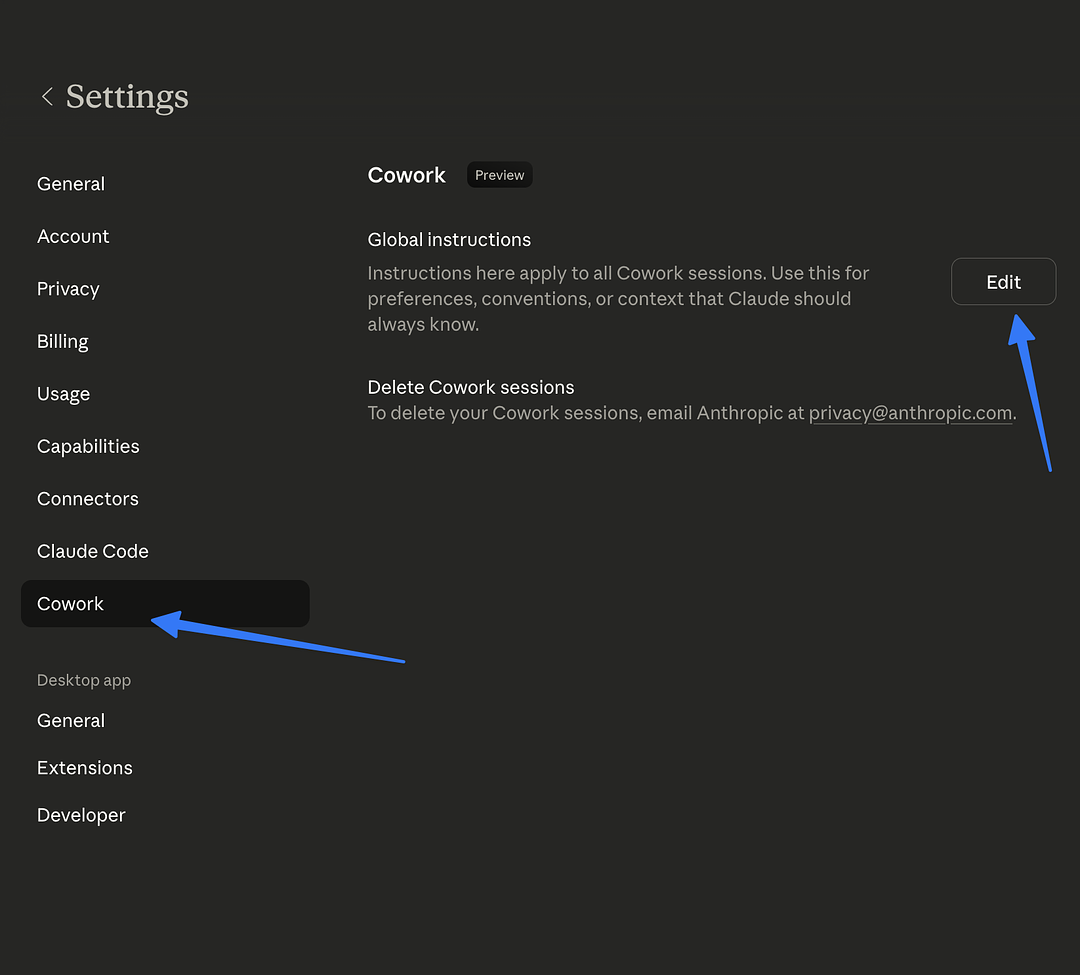
Role-Specific Global Instructions you can use
Choose the template for your role, then customize it with your specific brands, preferences, and standards:
Growth Marketer:
I'm a Growth Marketer. My work includes campaign strategy, funnel optimization, and performance analysis across multiple channels. When creating deliverables:
- Use data-driven language and include metrics where possible
- Default output format: Google Slides-ready or PDF
- Tone: professional but accessible, avoid jargon unless stakeholder-facing
- Always include actionable next steps in reports
- When analyzing data, highlight the top 3 insights first
Paid Social Marketer:
I'm a Paid Social Marketer managing Meta, TikTok, and LinkedIn ad campaigns. When helping me:
- Always think in terms of hooks, angles, and CTAs
- When writing ad copy, provide 3 variations minimum
- Include character counts for platform-specific limits
- Default to performance-focused language
- Reference platform best practices (Meta: 125 char primary text, etc.)
Email Marketer:
I'm an Email Marketer working on lifecycle campaigns, newsletters, and promotional emails. When helping me:
- Always provide subject line options (under 50 characters) with preview text
- Structure emails with a clear hierarchy: headline, body, CTA
- Default tone: conversational and action-oriented
- Include A/B testing suggestions when creating campaigns
- Consider mobile-first formatting
Graphic Designer:
I'm a Graphic Designer creating social media assets, presentation decks, and marketing collateral. When helping me:
- Think visually — describe layouts, color palettes, and composition
- When creating presentations, focus on minimal text and strong visuals
- Default to modern, clean design language
- Always consider brand consistency
- Provide design rationale for creative choices
Video Editor:
I'm a Video Editor creating social media videos, ads, and content clips. When helping me:
- Think in terms of hooks (first 3 seconds), pacing, and retention
- When scripting, include visual directions alongside dialogue
- Default format: vertical 9:16 unless specified
- Include timestamps and scene descriptions
- Suggest B-roll and transition ideas
Growth Analyst:
I'm a Growth Analyst working with campaign data, performance metrics, and reporting. When helping me:
- Always start with the key insight before showing data
- Default to creating charts and visualizations, not just tables
- Use clear labels and legends on all data outputs
- Include period-over-period comparisons when relevant
- Flag anomalies and outliers proactively
Social Marketer:
I'm an Organic Social Marketer managing content calendars and community engagement. When helping me:
- Think in platform-native formats (carousels, reels, threads)
- Always include hashtag suggestions (5-10 per post)
- Default tone: on-brand and engaging
- Consider posting time and platform algorithm preferences
- Repurpose content across platforms when possible
Paid Search Marketer:
I'm a Paid Search Marketer managing Google Ads and Bing Ads campaigns. When helping me:
- Think in terms of search intent, match types, and quality score
- When writing ad copy, respect character limits (30/30/90 for RSAs)
- Include negative keyword suggestions with every keyword list
- Default to structured, data-heavy outputs
- Always consider landing page relevance in recommendations
Customizing Your Template
After pasting the base template, add specifics about your current work:
Your brand's voice:"When writing for [Brand], use a witty, casual tone targeting young professionals aged 25-35."
Preferred tools:"I primarily work with Meta Ads Manager, Google Analytics 4, and Klaviyo."
Output preferences:"I prefer Excel over Google Sheets. Default to dark color schemes for presentations."
Common deliverables:"I create weekly performance reports, monthly strategy decks, and quarterly business reviews."
Test It
Ask Cowork something role-specific and check if the response reflects your instructions. For example: "Draft a quick summary of a campaign that got 500 conversions at $30 CPA." The tone, format, and detail level should match what you set.
1.2 Connecting Your Tools
Without connectors, you're manually downloading files from Notion, copy-pasting from Slack, and emailing yourself Google Docs. With connectors, Cowork pulls directly from these tools.
Setting Up Connectors
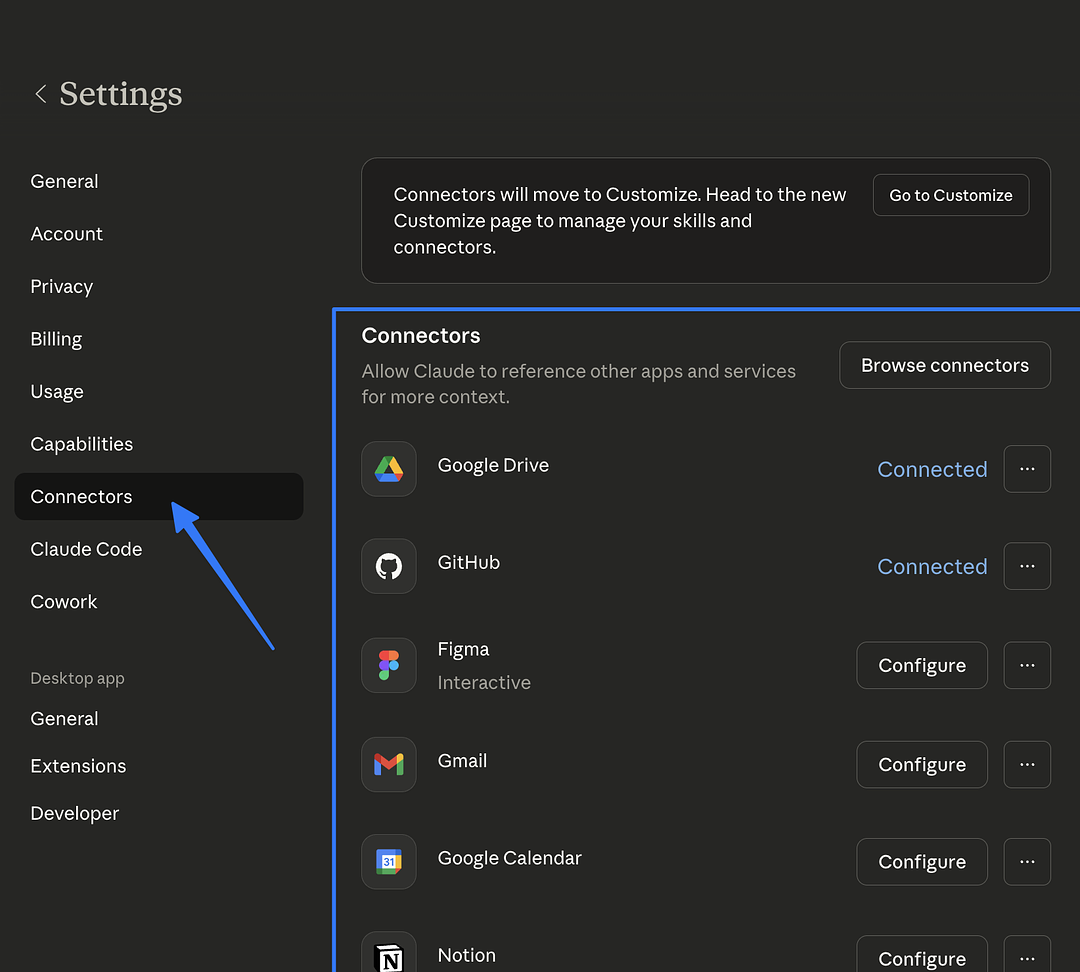
How to connect:
In Cowork mode, ask for something from the platform: "Pull my latest meeting notes from Notion"
Cowork will show a "Connect" button if not already connected
Click to authorize — you'll be redirected to the platform to grant permission
Once connected, Cowork can access the platform in all future sessions
Which Connectors to Set Up
Notion(if your team uses it): Cowork can read Notion pages, search databases, and pull project information directly into reports and deliverables.
Google Drive(if your team uses it): Cowork can search for and read Google Docs. Useful for pulling briefs, strategy docs, and meeting notes into your work.
Slack(if your team uses it): Cowork can read channel history and search messages. Great for pulling action items from conversations into structured documents.
Exercise: Connect and Test
Connect at least one platform you use daily
Ask Cowork to pull something from it: "Search my Notion for anything about [project name]" or "Find recent documents in my Google Drive about [topic]"
Ask Cowork to turn what it found into a deliverable: "Summarize the key points into a one-page brief"
1.3 Exploring Extensions
Extensions let Cowork interact with apps and services running on your computer. While connectors link Cowork to cloud platforms like Notion and Google Drive, extensions give it access to local applications you already use every day.
What Are Extensions?
Extensions connect Cowork to apps installed on your Mac or PC. For example, extensions can let Cowork send iMessages, control your browser, manage files and folders, or interact with other desktop applications. Think of them as giving Cowork hands to use the same tools you use.
Examples of Extensions
iMessage: Send and read messages directly through Cowork
Browser Control: Navigate websites, fill forms, and extract information
File Management: Organize, rename, and move files on your computer
System Controls: Interact with Mac or Windows features and settings
How to Explore
Ask Cowork: "What extensions are available?" It will show you what's currently supported for your operating system.
Exercise: Try an Extension
Ask Cowork what extensions are available on your system
Try one out with a simple task (e.g., "Send an iMessage to [contact] saying hello")
Think about which local app workflows you could streamline with extensions
1.4 CLAUDE.md Files: Brand-Specific Brains
Global instructions set your general preferences. CLAUDE.md files set brand-specific rules. When working in Brand X's folder, Cowork automatically uses Brand X's voice, colors, KPIs, and reporting format.
How It Works
You create a file called CLAUDE.md inside any project folder. When Cowork accesses that folder, it reads the file and applies those rules to everything it creates in that session.
Building Your First CLAUDE.md
Here's a template you can adapt for any brand or project:
# [Brand/Project Name] Instructions

## Brand Voice
- Tone: [e.g., Witty and modern / Professional and authoritative / Warm and approachable]
- Always use: [e.g., Active voice, short sentences, conversational language]
- Never use: [e.g., "leverage," "synergy," "circle back," corporate jargon]

## Visual Identity
- Primary colors: [e.g., Navy #1a1a2e, Gold #e2b714]
- Secondary colors: [e.g., Light gray #f5f5f5, White #ffffff]
- Font preferences: [e.g., Clean sans-serif, modern]
- Presentation style: [e.g., Minimal text, data-heavy, one insight per slide]

## KPIs & Metrics
- Primary: [e.g., CPA, ROAS, MQLs]
- Secondary: [e.g., CTR, Engagement Rate, Email Open Rate]
- Always include: [e.g., Month-over-month comparison, year-over-year when available]

## Reporting Standards
- Weekly deliverable: [e.g., Channel performance snapshot (Excel)]
- Monthly deliverable: [e.g., Full performance deck (PowerPoint)]
- Quarterly deliverable: [e.g., Strategic review document (Word)]
- Dashboard format: [e.g., Interactive HTML with dark theme]

## Target Audience
- [e.g., Women 28-45 interested in wellness and clean beauty]
- [e.g., Income $75K+, urban, active on Instagram and TikTok]

## Competitors to Track
- [List key competitors]

## Important Notes
- [Any brand-specific rules, preferences, or things to avoid]
1.5 Creating Your First Skill
Skills are saved instruction sets that Cowork can execute on command. They let you turn a one-time task into a repeatable, shareable automation.
What's a Skill?
A Skill is a SKILL.md file that contains detailed instructions for a specific task. When Cowork recognizes a request that matches a Skill, it follows those instructions exactly — producing consistent, high-quality output every time.
Anatomy of a Skill
---
description: Generates a weekly channel performance report from raw campaign data
---

# Weekly Performance Report

## Instructions
When given campaign data, create a professional performance report:

1. Calculate CPA, ROAS, and conversion rate for each channel
2. Identify the top performer and biggest concern
3. Compare to previous period if data is available
4. Create a PowerPoint deck with:
   - Executive summary slide with 3 key metrics
   - Channel-by-channel slides with charts
   - Recommendations slide with 2-3 action items
5. Use the brand colors from CLAUDE.md if available
Exercise: Build Your First Skill
Ask Cowork to help you create a Skill for your most common repeating task:
"Help me create a Cowork Skill for [your most frequent task]. Here's what it should do: [describe the input, the processing, and the desired output]. Create this as a SKILL.md file."
Test it by giving Cowork sample data and running the Skill. Refine the instructions until the output consistently matches your standards.
Sharing Skills Across the Team
Skill files can be shared like any document — via Slack, Google Drive, or a shared folder. When every team member has the same Skill, everyone produces the same quality output. This is how you scale quality across your entire team.
1.6 Your Complete Brain Checklist
Before moving to Lesson 2, confirm everything is set up:
Claude Desktop installed and signed in
Global instructions customized for your role
At least 1 CLAUDE.md file created for a brand or project
At least 1 connector set up (Notion, Google Drive, or Slack)
Extension marketplace explored
At least 1 custom Skill created and tested
Understand the difference between Chat and Cowork mode
Why this all matters: A marketer using Cowork without this setup is like using a new laptop without installing any apps, setting any preferences, or signing into any accounts. It technically works, but it's a fraction of what it could be. This setup is the difference between Cowork being "pretty useful" and being a genuine 10x multiplier for your work.
Unlock all 7 courses & 52 lessons
Hands-on AI training for marketers, built by GrowthPair. Track your progress, ask the built-in AI tutor, pass quizzes, and earn your AI Marketer certificate.